Introduction to Sleep as Android: Smart Alarm
Sleep as Android is a revolutionary sleep tracking and smart alarm application that has taken the world of sleep technology by storm. With its innovative features and advanced sleep tracking capabilities, it has become a go-to solution for individuals seeking to improve the quality of their sleep and wake up feeling refreshed and energized. In this comprehensive blog post, we will delve into the world of Sleep as Android, exploring its features, benefits, and how it can help you achieve a better night’s sleep.
What is Sleep as Android: Smart Alarm?
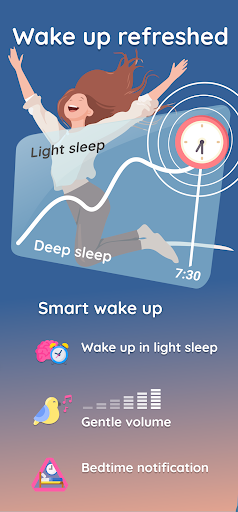
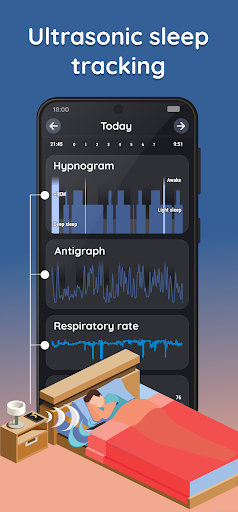
Sleep as Android is a smart alarm application that uses advanced sleep tracking technology to monitor your sleep patterns and wake you up during the lightest phase of sleep. This ensures that you wake up feeling rested and refreshed, rather than groggy and disoriented. The application uses a combination of accelerometer and gyroscope data from your smartphone to track your sleep patterns, including the duration of your sleep, sleep cycles, and sleep quality.
Key Features of Sleep as Android: Smart Alarm
The Sleep as Android application is packed with a range of innovative features that make it a comprehensive sleep tracking and smart alarm solution. Some of the key features include:
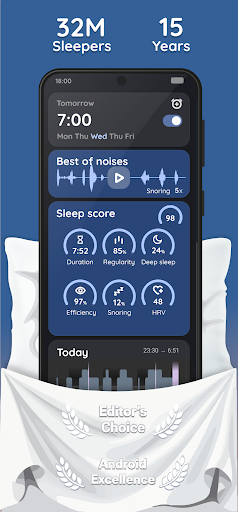
- Advanced sleep tracking: The application uses advanced algorithms to track your sleep patterns, including the duration of your sleep, sleep cycles, and sleep quality.
- Smart alarm: The application wakes you up during the lightest phase of sleep, ensuring that you wake up feeling rested and refreshed.
- Customizable alarm settings: You can customize your alarm settings to suit your needs, including setting the alarm time, snooze duration, and alarm tone.
- Sleep cycle tracking: The application tracks your sleep cycles, including the duration of your deep sleep, light sleep, and REM sleep.
- Sleep quality tracking: The application tracks your sleep quality, providing you with insights into how well you slept and what you can do to improve your sleep quality.
- Integration with wearable devices: The application integrates with wearable devices, such as fitness trackers and smartwatches, to provide a more comprehensive picture of your sleep patterns.
Benefits of Using Sleep as Android: Smart Alarm
Using Sleep as Android: Smart Alarm can have a significant impact on the quality of your sleep and your overall health and well-being. Some of the benefits of using the application include:
- Improved sleep quality: The application helps you wake up feeling rested and refreshed, which can lead to improved sleep quality and a reduced risk of sleep disorders.
- Increased energy levels: Waking up during the lightest phase of sleep can help increase your energy levels, making it easier to tackle your daily activities.
- Enhanced mental clarity: The application can help improve your mental clarity and focus, making it easier to concentrate and stay productive throughout the day.
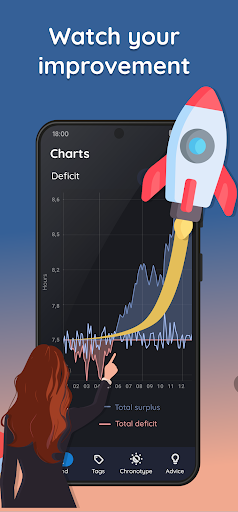
- Better sleep habits: The application provides you with insights into your sleep patterns, helping you identify areas for improvement and develop better sleep habits.
- Reduced risk of sleep disorders: The application can help reduce the risk of sleep disorders, such as insomnia and sleep apnea, by providing you with a more comprehensive understanding of your sleep patterns.
How to Use Sleep as Android: Smart Alarm
Using Sleep as Android: Smart Alarm is easy and straightforward. Here’s a step-by-step guide to get you started:
- Download and install the application: Download the Sleep as Android application from the Google Play Store or Apple App Store and install it on your smartphone.
- Configure your settings: Configure your alarm settings, including setting the alarm time, snooze duration, and alarm tone.
- Place your smartphone: Place your smartphone on your bed or near your pillow to track your sleep patterns.
- Go to sleep: Go to sleep as you normally would, and let the application track your sleep patterns.
- Wake up: The application will wake you up during the lightest phase of sleep, ensuring that you wake up feeling rested and refreshed.
Tips for Getting the Most Out of Sleep as Android: Smart Alarm
To get the most out of Sleep as Android: Smart Alarm, here are some tips to keep in mind:
- Be consistent: Consistency is key when it comes to sleep. Try to go to bed and wake up at the same time every day, including weekends.
- Create a sleep-conducive environment: Create a sleep-conducive environment by ensuring your bedroom is dark, quiet, and cool.
- Avoid caffeine and nicotine: Avoid consuming caffeine and nicotine close to bedtime, as they can disrupt your sleep patterns.
- Exercise regularly: Regular exercise can help improve the quality of your sleep, but avoid exercising close to bedtime.
- Manage stress: Manage stress by practicing relaxation techniques, such as meditation or deep breathing.
Common Issues and Troubleshooting
Like any application, Sleep as Android: Smart Alarm may experience some issues or glitches. Here are some common issues and troubleshooting tips:
Whats News of Sleep as Android: Smart alarm
We are constantly improving this app with several updates monthly. Bringing timely fixes and new features you ask for. Detailed release notes at:
https://sleep.urbandroid.org/docs/general/release_notes.html
- Application not tracking sleep: If the application is not tracking your sleep, ensure that your smartphone is placed correctly on your bed or near your pillow.
- Application not waking you up: If the application is not waking you up, ensure that your alarm settings are configured correctly and that your smartphone is fully charged.
- Application crashing: If the application is crashing, try restarting your smartphone or reinstalling the application.
Conclusion
Sleep as Android: Smart Alarm is a comprehensive sleep tracking and smart alarm application that can have a significant impact on the quality of your sleep and your overall health and well-being. With its advanced sleep tracking technology, customizable alarm settings, and integration with wearable devices, it is a must-have application for anyone looking to improve their sleep quality. By following the tips and troubleshooting guides outlined in this blog post, you can get the most out of Sleep as Android: Smart Alarm and start waking up feeling rested and refreshed.










There are no comments yet :(