Introduction to AppMgr Pro III (App 2 SD)
AppMgr Pro III, also known as App 2 SD, is a powerful Android application that helps users manage their installed apps, move them to the SD card, and free up internal storage space. With its intuitive interface and robust features, AppMgr Pro III has become a popular choice among Android users who want to optimize their device’s performance and storage capacity. In this article, we will delve into the features, benefits, and usage of AppMgr Pro III, and explore how it can help you get the most out of your Android device.
Key Features of AppMgr Pro III
AppMgr Pro III offers a wide range of features that make it an essential tool for Android users. Some of its key features include:
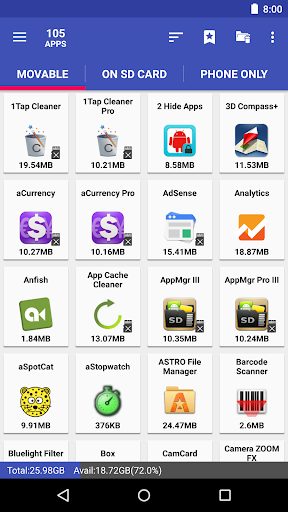
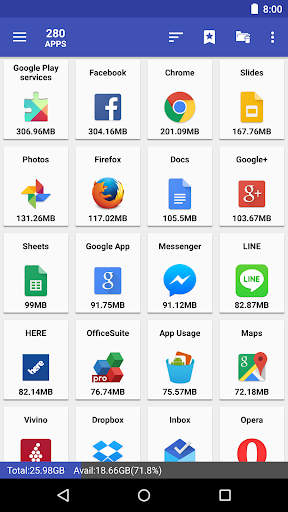
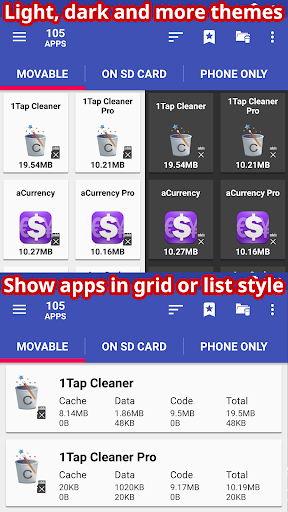
- App management: AppMgr Pro III allows you to view, manage, and organize your installed apps in a single interface. You can sort apps by name, size, and installation date, and also search for specific apps.
- App moving: The app enables you to move installed apps to the SD card, which helps to free up internal storage space and reduce the load on your device’s internal memory.
- Batch operations: AppMgr Pro III supports batch operations, allowing you to move, uninstall, or clear data for multiple apps at once.
- App backup: The app allows you to backup your installed apps, including their data and settings, to the SD card or external storage.
- Task killer: AppMgr Pro III includes a task killer feature that helps to terminate running apps and processes, freeing up system resources and improving device performance.
Benefits of Using AppMgr Pro III
Using AppMgr Pro III can bring several benefits to your Android device, including:
- Improved performance: By moving apps to the SD card and freeing up internal storage space, AppMgr Pro III can help improve your device’s performance and reduce the likelihood of crashes and freezes.
- Increased storage capacity: AppMgr Pro III helps to free up internal storage space, which can be used to store more apps, photos, videos, and other data.
- Enhanced battery life: By terminating running apps and processes, AppMgr Pro III can help reduce power consumption and extend your device’s battery life.
- Convenience: The app’s intuitive interface and batch operations feature make it easy to manage your apps and perform tasks quickly and efficiently.
How to Use AppMgr Pro III
Using AppMgr Pro III is straightforward and easy. Here’s a step-by-step guide to get you started:
- Download and install AppMgr Pro III from the Google Play Store.
- Launch the app and grant the necessary permissions.
- View and manage your installed apps: AppMgr Pro III will display a list of your installed apps, including their size, installation date, and other details.
- Move apps to the SD card: Select the apps you want to move and choose the “Move to SD card” option.
- Batch operations: Select multiple apps and choose the “Batch operations” option to move, uninstall, or clear data for the selected apps.
- Backup apps: Select the apps you want to backup and choose the “Backup” option to save them to the SD card or external storage.
Tips and Tricks for Using AppMgr Pro III
Here are some tips and tricks to help you get the most out of AppMgr Pro III:
- Regularly clean up your apps: Use AppMgr Pro III to regularly clean up your apps, including unused apps, residual files, and cache data.
- Move apps to the SD card: Move as many apps as possible to the SD card to free up internal storage space and improve device performance.
- Use batch operations: Use batch operations to perform tasks quickly and efficiently, such as moving or uninstalling multiple apps at once.
- Backup your apps: Regularly backup your apps, including their data and settings, to prevent data loss in case you need to reset or replace your device.
AppMgr Pro III vs. Other App Management Tools
AppMgr Pro III is not the only app management tool available for Android devices. Here’s a comparison with other popular app management tools:
- CCleaner: CCleaner is a popular app management tool that offers features such as app cleaning, cache cleaning, and registry cleaning. However, it lacks the app moving and batch operations features offered by AppMgr Pro III.
- App Booster: App Booster is an app management tool that offers features such as app acceleration, cache cleaning, and battery saving. However, it lacks the app moving and backup features offered by AppMgr Pro III.
- DU Speed Booster: DU Speed Booster is an app management tool that offers features such as app acceleration, cache cleaning, and battery saving. However, it lacks the app moving and batch operations features offered by AppMgr Pro III.
Conclusion
AppMgr Pro III is a powerful and feature-rich app management tool that offers a wide range of benefits for Android users. Its intuitive interface, robust features, and batch operations make it an essential tool for managing apps, moving apps to the SD card, and freeing up internal storage space. By using AppMgr Pro III, you can improve your device’s performance, increase storage capacity, and enhance battery life. Whether you’re a casual user or a power user, AppMgr Pro III is a must-have tool for any Android device.
FAQs
Here are some frequently asked questions about AppMgr Pro III:
Whats News of AppMgr Pro III (App 2 SD)
v6.08
★ new function to pin app groups to the drawer menu of the top window
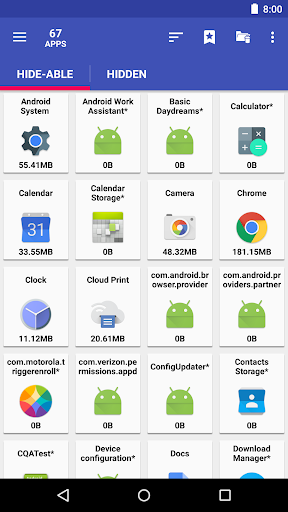
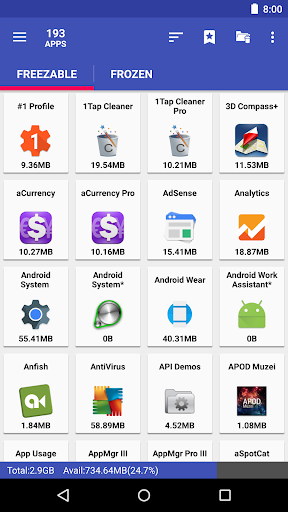
★ Freeze apps window: new "Show system apps" and "Non-openable apps" options
★ fixed: failed to clear cache and freeze apps on Meizu devices
★ see FAQ #20 if the clear cache function fails to start or complete
★ send me an email if you'd like to help with the translation
★ bugs fixed and optimizations
- Q: Is AppMgr Pro III free to use? A: Yes, AppMgr Pro III is free to download and use, with optional in-app purchases for premium features.
- Q: Does AppMgr Pro III support batch operations? A: Yes, AppMgr Pro III supports batch operations, allowing you to move, uninstall, or clear data for multiple apps at once.
- Q: Can I backup my apps using AppMgr Pro III? A: Yes, AppMgr Pro III allows you to backup your installed apps, including their data and settings, to the SD card or external storage.
- Q: Is AppMgr Pro III compatible with my device? A: AppMgr Pro III is compatible with most Android devices, including smartphones and tablets. However, it’s always a good idea to check the app’s compatibility with your device before downloading and installing it.
Final Thoughts
AppMgr Pro III is a powerful and feature-rich app management tool that offers a wide range of benefits for Android users. Its intuitive interface, robust features, and batch operations make it an essential tool for managing apps, moving apps to the SD card, and freeing up internal storage space. Whether you’re a casual user or a power user, AppMgr Pro III is a must-have tool for any Android device. So why wait? Download AppMgr Pro III today and start optimizing your device’s performance and storage capacity!









There are no comments yet :(